<img height="1" width="1" style="display:none" src="https://www.facebook.com/tr?id=1001541641769388&amp;ev=PageView&amp;noscript=1">

Employee Expense Management

Centralise reimbursements and ensure compliance with smart guardrails and workflows according to expense policies before disbursement.
Untitled-16

Effortless Expense Management for everyone

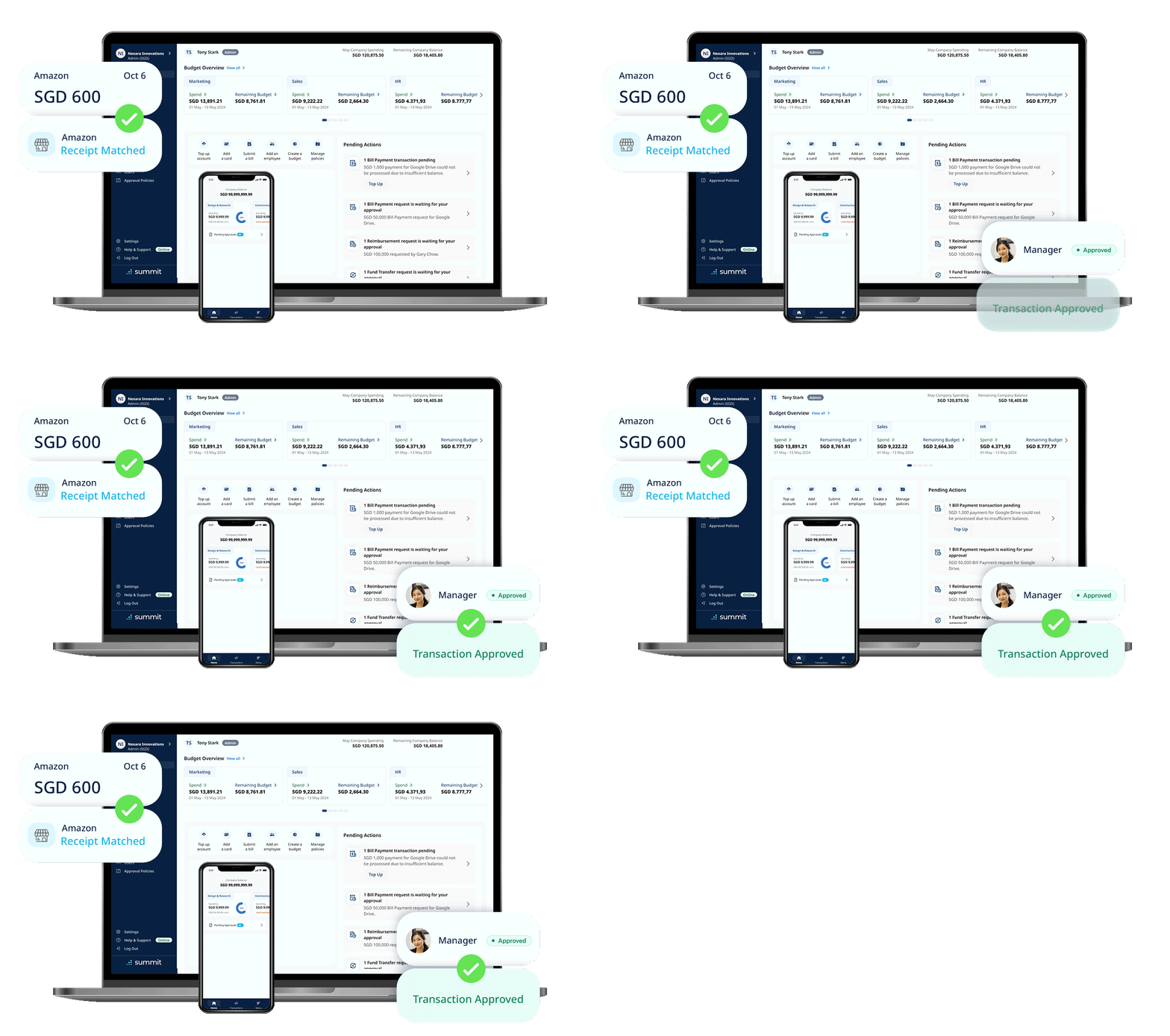
AI-powered smart scanning enables swift claim submissions for employees. Finance teams access audit trails, reducing risks from manual entry and tool switching.
Icon EEM 1 - No more paperwork

No more paperwork

Easily submit expense claims from anywhere with Summit's mobile app. Say goodbye to paper receipts.

Icon EEM 2 - End fragmented tracking

End fragmented tracking

Stop relying on multiple tools for expense tracking. With our platform, all non-payroll spending is centralised. 

Icon EEM 3 - Enforce expense policy

Enforce expense policy

Automate processing with custom workflows, and ensure compliance with present rules, limits and alerts.

Effortless Expense Management for everyone

AI-powered smart scanning enables swift claim submissions for employees. Finance teams access audit trails, reducing risks from manual entry and tool switching.
Icon EEM 1 - No more paperwork

No more paperwork

Say goodbye to messy stacks of receipts. With Summit, employees can generate their digital employee expense report instantly. 
Icon EEM 2 - End fragmented tracking

End fragmented tracking

Stop relying on multiple tools for expense tracking. With our platform, all non-payroll spending is centralised. 

Icon EEM 3 - Enforce expense policy

Enforce expense policy

Automate processing with custom workflows, and ensure compliance with present rules, limits and alerts.

Trusted across industries


  • All Port Cargo Services Logo
  • Solecare Podiatary Logo
  • %ARABICA_full_Logo.svg
  • Lemonfridge Interior Design Studio Logo
  • EMA global
  • tokka labs
  • verdant-energy
  • Singapore Gymnastics Logo-1
  • Infinitus Advisory
  • Presto
  • Slimstock Logo
  • motion for impact
  • All Port Cargo Services Logo
  • Solecare Podiatary Logo
  • %ARABICA_full_Logo.svg
  • Lemonfridge Interior Design Studio Logo
  • EMA global
  • tokka labs
  • verdant-energy
  • Singapore Gymnastics Logo-1
  • Infinitus Advisory
  • Presto
  • Slimstock Logo
  • motion for impact
Icon EEM 4 - Intelligent receipt scanning

Intelligent receipt scanning

Boost efficiency and accuracy with AI-powered smart scanning feature. Auto-populate receipt details, simplifying reimbursement requests.


expense-management-software
Icon EEM 5 - Advanced approval automation

Advanced approval automation

Remove bottlenecks in the approval process. Route reimbursements to the correct approvers and flag non-compliant claims in real-time. 

expense-report-management
Icon EEM 6 - Seamless expense tracking

Seamless expense tracking

Our centralised solution helps finance teams monitor expenses efficiently, track budget allocations, and generate detailed reports. 

employee-expense-claim-management
Icon EEM 7 - Instant data and forecasting

Instant data and forecasting

Access real-time insights into your organisation’s spending. Our system delivers instant, data-driven reports to help you make strategic decisions. 

automated-expense-management

Hit play to experience the Summit difference 

Summit effortlessly manages your expenses from receipt to reimbursement. Simply scan, review, approve, and process.

Our integration partners

  • xero logo
  • quickbooks
  • oracle netsuite_
  • freshbooks
  • clearbooks
  • sage
  • zoho
  • microsoft
  • myob
  • xero logo
  • quickbooks
  • oracle netsuite_
  • freshbooks
  • clearbooks
  • sage
  • zoho
  • microsoft
  • myob

FAQs

Frequently asked questions about Summit's Employee Expense Management software.
Why choose Summit's Employee Expense Management system?

Summit’s employee expense claim management solution delivers more than just efficiency and productivity. It enhances compliance, streamlines processes, and provides real-time insights — giving your team the tools they need to manage expenses effectively and focus on strategic business objectives.

What are the benefits of Summit's Employee Expense Management solution?

Summit cuts claim submission time by 86%, eliminates duplicate receipts, enforces expense policies without manual review, and gives finance teams real-time visibility into every dollar spent. It also reduces IRAS audit risk by ensuring GST is accurately captured. 

How does Summit's Employee Expense Management work?
Our centralised dashboard makes employee expense management easier than ever. Finance teams can quickly handle reimbursement requests while ensuring compliance with company policies. This streamlined process minimises the risk of errors and delays, ensuring smooth operations and greater employee satisfaction.
How does an employee submit an expense claim using Summit?
 Open the Summit mobile app, snap a photo of the receipt, and submit. Summit AI extracts the details automatically. The claim is then routed to the relevant approver based on your company's approval matrix — no emails required. Employees can track claim status in real time from the app. 
How does Summit's Employee Expense Management solution help finance teams?

 Summit helps finance teams prevent over-reimbursement by enforcing expense policies automatically at the point of submission. Built-in controls flag non-compliant claims in real time, AI-powered anomaly detection identifies suspicious patterns, and all approvals are routed to the correct approver without manual intervention — reducing processing time by up to 86%. 

Can employees submit expense claims on their mobile device?

Yes, simply snap a photo of your receipts and submit an expense claim on the go using our Summit mobile app.  It's that easy to use our invoice management software! 

What details do employees need to enter when submitting a claim?

 Virtually none. Summit's AI scans receipts and auto-populates all key fields — vendor name, date, amount, currency, and GST details. Employees snap a photo on the mobile app and Summit does the rest. If a field cannot be read clearly, Summit flags it for review rather than guessing. 

Can approvers approve expense claims remotely?
 Yes. Approvers receive instant notifications and can approve, reject, or request more information directly from the Summit platform or mobile app — from any device, anywhere. 
How does Summit enforce company expense policies?

 You define your expense policies in Summit — spending limits by role, category, or department, along with rules for what is or is not reimbursable. Summit enforces these automatically when a claim is submitted, flagging or blocking non-compliant requests before they reach the approver. Policies can be updated at any time without IT involvement. 

How does Summit prevent duplicate expense claims?
 Summit's AI cross-checks every new submission against existing claims using document fingerprinting. If a duplicate receipt is detected — same vendor, same date, same amount — it is flagged before reaching the approver. This is how % Arabica eliminated 90% of duplicate claims after implementing Summit. 
How does Summit support IRAS compliance for employee expense claims in Singapore?
Summit automatically captures GST details from receipts, validates tax invoices.
How can I track spending?

Track spending in real time through customisable dashboards, alerts, and reports—making it easy to monitor budgets and prevent overspending.

Does Summit Platform provide reporting and analytics on my spend?

Summit provides real-time updates and detailed reports to help you analyse spending by each individual, team, category, or time period—giving finance teams full visibility and control. Our staff claim system ensures all expenses are tracked efficiently, helping businesses stay on top of their financial data.

Can Summit handle multi-currency expense claims?
 Yes. Summit detects the currency on receipts automatically and can flag or convert amounts based on your company's currency policy. This is especially useful for employees who travel internationally or operate across multiple markets. 
Does Summit integrate with payroll systems for reimbursements?
Summit currently integrates with major accounting platforms (Xero, QuickBooks, NetSuite, and others) and generates reimbursement-ready export files. For payroll integration, speak to the Summit team about your specific system requirements. 
How does Summit’s Employee Expense Management software simplify the expense reporting process for employees?
Summit’s Employee Expense Management software provides employees with an intuitive platform to easily submit expenses. Employees simply just need to scan their receipts, transaction details will be captured for  processing and creation of expense reports. Summit helps streamline the entire process and reducing administrative burden.

Take charge of your expenses today

Get in touch with the Summit team for detailed information and personalised support.